

An unforgettable moment
Create the event in a few clicks — team day, olympics, rally, escape game. Your participants join via the QR code or the invitation link and add their photos and videos.
Beyond collecting photos and videos, Eventer’s goal is yours: making the day a success — live projection on screen, photobooth, effects, animations, comments, likes, chat, After Movie…
From a half-day with colleagues to the seminar bringing several sites together, from basic to full option, with your company’s logo and colours — Eventer adapts to your needs and your budget. Join the experience that has already won over nearly a million users.
A motivated team
Eventer transforms your events into experiences where everyone participates, interacts and has fun. With engaging features (live projection, camera filters, photobooth, likes contest) and real-time interactions (likes, comments, chat), your guests become active players in the event. This interactivity strengthens bonds, sparks conversations and creates a unifying dynamic.
With its advanced features, an experienced and responsive team, Eventer adapts to your requirements and seamlessly integrates with your event’s theme.
Accessible on mobile, with or without the app, and on desktop.
An amazing app with an extraordinary team for your events!
Thanks to the Eventer app, we had the opportunity to share all our wonderful experiences together!
The app is very effective and truly meets the professional needs of event organizers.
We were able to retrieve all the content for our internal newsletter the very next day.
Team building in Ardèche. The live projection in the evening created a real moment of togetherness.
Simple and effective. No need to explain, everyone got it.
Technical question at 10 PM during the event. Response in under a minute. Impressive.
A sharing app that complies with the GDPR and lets us share our memories
Easy-to-access tool, available through the app or the web, simple to set up. Very pleasant for sharing the photos of an event, and it lets guests take part: they add photos very simply.
Great app, easy to use for sharing our memories as a group on any occasion!
Great — this app gets every guest involved 👍
Fast, easy to use, very practical. The bonus: a free video compiled by the app from the event, with the photos and videos the group liked most.
Great app, sharing photos is simple and fast. Videos up to 30 s in the free version, which is already decent. Easy to use, and the Live Show on a PC displays new photos live — brilliant! Worth a try if you haven’t yet.
Excellent app and extraordinary support, plus time-saving features, affordable pricing — IN SHORT: THE BEST
Great, friendly app and the support is top notch!
I love EVENTER. Simple, easy and effective 👍🏼 THANK YOU SO MUCH




















































Base version
Free and with no commitment, the base version is ideal for a first experience with Eventer.
Photos, videos, GIFs and texts
Photos, videos, GIFs, texts — everything you need to capture the event. (high-quality Quad HD photos, max 30 sec per video, extendable with an option)
Multiple uploads
Batch import from smartphone or computer. Ideal for the photographer or video provider.
Network resilience
Saturated wifi or spotty 4G? Eventer is designed to keep working and resume as soon as the network comes back.
Camera with effects
Filters, accessories, background change, faceswap, animations, text, drawing…
(can be disabled with the Control Pack option)
Photobooth
Digital photobooth with built-in effects on computer, tablet or smartphone.
Read our article about the photoboothLikes and comments
Every photo and video can be liked and commented on. Creates a fun dynamic among guests.
Organizer banner
Display a message at the top of the event to welcome guests or make an announcement.
Event Chat
Built-in discussion channel (announcements, reactions, questions, …)
Notifications
If they wish, guests are notified when they are liked or commented on, there are new photos or a new message (Event Chat).
Likes contest
Gamify your event — the most popular photo/video takes the spotlight.
Map and directions
Guide guests to the event venue.
Guest list
View participants and their activity.
Backup
Individual or batch export, compatible with your communication tools.
Sort and search
Chronological order. Sort by likes, by guest, …
Moderation
Guests can report content and comments. The administrator can delete inappropriate content and exclude unruly guests.
No duplicates
Eventer makes sure the same photo or video doesn’t appear more than once in the album.
Unlimited
As many guests, photos and videos as you like. Server fees for events with more than 500 guests.
Pin
Highlight important content.
Live Movie
Broadcast live on screen. Immersive full-screen display, photos, videos, likes and comments live — participation and atmosphere guaranteed.
Privacy and image rights
Events are accessible only by invited guests. At any time, the organizer can delete the entire event and each guest can request the removal of their image or delete their contributions.
Eventer claims no rights over content or data and is GDPR-compliant. Our servers are located in Europe.
After Movie
Ends the event on a high note.
Your guests make the film: their likes pick the best moments, and the music adds the emotional touch.
The After Movie stays alive: late photos join in, and it reacts to new likes.
And if you’d like to create your own video, that’s possible too — with Eventer Video.
Try Eventer now
It’s free — and the best way to discover what Eventer can offer you.
A question?
Eventer listens to its users and provides 7-days-a-week support, available at every step, for the organizer and guests alike. No automated replies: a human guides and advises you, for a smooth, worry-free experience.
Your questions about team building photo sharing
Who can see the photos from the day?
Only the people you invite: the album is neither public nor indexed. You can remove any content or exclude someone at any time. Eventer is GDPR-compliant, with servers in Europe, and claims no rights over your content.
What about your employees' image rights?
Everyone stays in control of their own image: an employee can delete their own contributions or ask for a photo they appear in to be removed, and the organiser can erase any content. Nobody is required to take part. Eventer does not use facial recognition: no face is analysed or indexed.
Can we get an invoice?
Yes. When creating the event, choose « Corporate event »: invoicing in the company’s name is available for corporate events, with everything your accounting department needs.
Does anyone need to install an app?
No, everyone chooses: without an app via the web page, or with the app (App Store, Google Play) — we explain the differences. One click on the link or a scan of the QR code is enough, with no account to create.
That matters on a team day: nobody loses ten minutes installing anything before you start.
How does it work when the teams are split into groups?
Every team feeds the same album, wherever they are: each one sees live what the others are doing, even at the far end of the course. The likes contest does the rest — the most popular photo appears at the top of the event, which naturally creates friendly rivalry between groups.
Can we use the company’s logo and colours?
Yes. The event banner carries your message, and the Pro Filters option lets you import your own filters and background images for the camera and the photobooth — a frame in your brand colours, a logo, an illustration. The result: photos that are instantly recognisable and reusable.
Can we control what participants are able to do?
Yes, with the Control Pack option: read-only album, chat restricted to administrators, content limited to the period of the day or to direct camera capture, comments switchable off. You can also disable the more playful camera effects to keep control over the company’s tone and image.
How many people can take part?
The number of participants is unlimited, even in the free version — from a team of ten to a seminar bringing several sites together. Beyond 500 participants, only server costs apply.
What if the activity takes place outdoors, with no network?
That is the most common case in team building, and Eventer is built for it: forest, mountain, activity park, saturated wifi, unreliable 4G — the app keeps working and interrupted uploads resume automatically as soon as the network is back. Nobody has to deal with it, nothing is lost.
What if the same photo or video is added more than once?
Eventer has a content-based duplicate detection system. It therefore only appears once, even if it is added again from another device.
What if inappropriate content is posted?
Participants can report content, and the administrator can delete it or exclude its author. For complete peace of mind, the AI Moderation option blocks inappropriate content in real time.
Can the photos be reused for internal communications?
Yes: retrieve all the photos and videos in a few clicks for your intranet, your internal newsletter, your careers page or your social media. With the Full Pack option you keep the original quality and the metadata — ideal for printing.
Can people join the event before the day?
Yes: as soon as the event is created, you can send the invitation link or print the QR code on the programme, the badges or the tables. Everyone can then get familiar with Eventer beforehand.
Can photos be added after the day?
Yes: the facilitator, the provider and latecomers alike can add their photos and videos afterwards, from a phone or a computer. Everyone is notified, and the After Movie includes them automatically.
Can we create a memory video of the day?
Yes: Eventer Video creates a real video — an MP4 file to download and share — from the photos and videos of the day. You choose the moments, the music, the length and the format. Ideal to open the next team meeting. Discover Eventer Video.
How much does Eventer cost for a team building?
The essentials are free: private album, unlimited participants, unlimited photos and videos, photobooth, Live Movie projection, After Movie.
If you want to go further, some options are particularly at home on a team day: Pro Filters to brand the camera and the photobooth, the Control Pack for a tightly framed use, Full Pack for printing, and the Live Show for the end-of-day projection.
Paid options
Enhance guest experience and engagement with customization, animation and content management options tailored to your requirements.
Live Show
The Live Show animates the event and drives engagement. Connect a computer to a screen and broadcast content live! Configure it directly from your smartphone and send messages to the screen.
Full Pack
All event photos are saved without any alterations. The original resolution and metadata (GPS, dates, orientation…) are preserved — ideal for printing photos, even in large formats. Guests can also add videos longer than 30 seconds, up to 6 GB each.
A tip: activate the option before the event — it only applies to photos and videos added once it’s active.
Personalized Filter
Easily customize the camera and Photobooth by creating a filter directly in Eventer: frame, color, text, character…
Pro Filters
The Pro Filters option allows you to upload filters (PNG) and a background image (JPG) for the camera and the Photobooth. Ideal for precise graphic design or adding a logo. These can be easily created by a graphic designer. If needed, our designer can also take care of it.
Quiz
Liven up your event with an interactive quiz. The AI assistant writes the whole quiz in one click and checks every answer.
Your guests play from their smartphone using the same QR code as the photos/videos. The results join the event album.
More on our article Nailing Your Quiz.
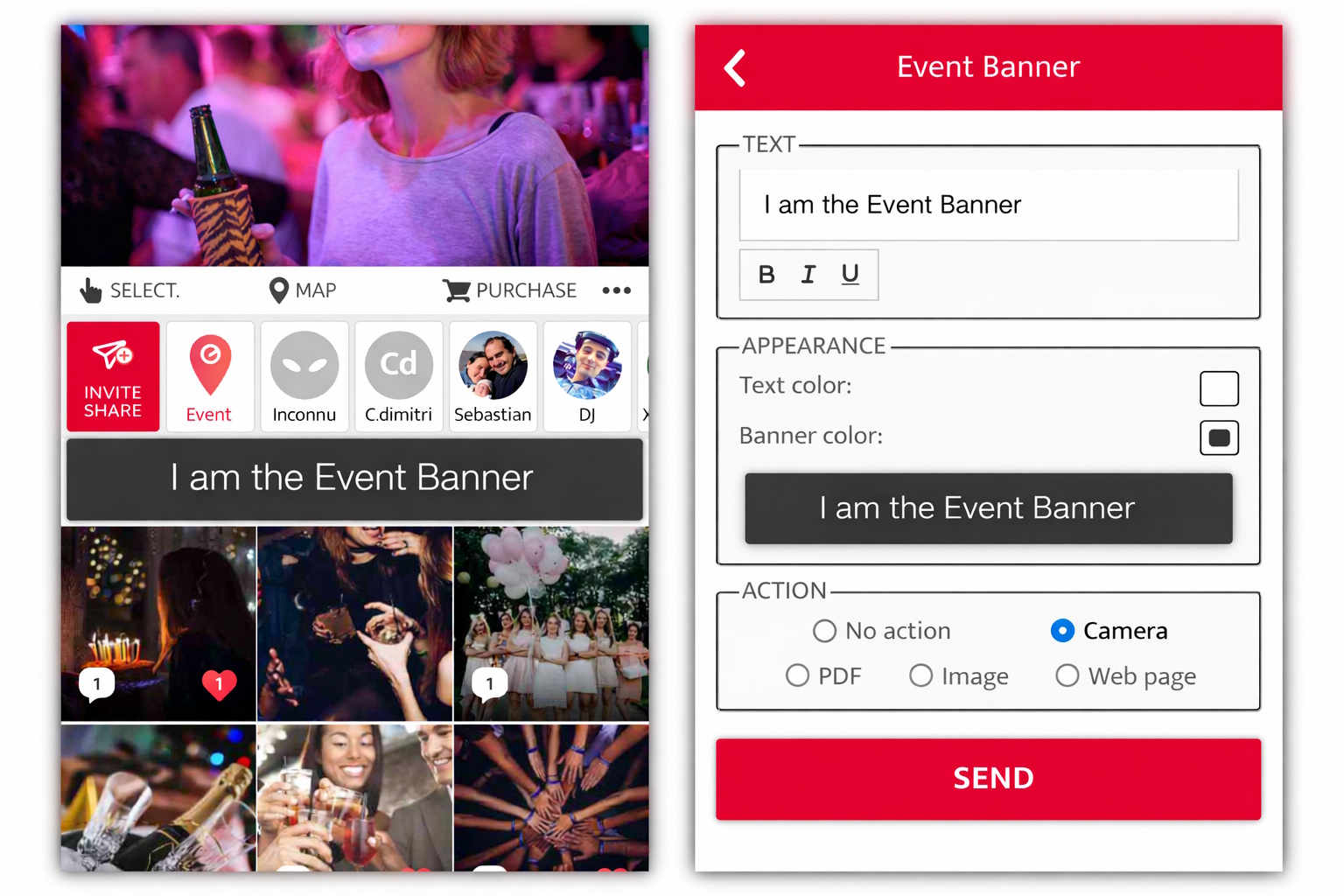
Banner Plus
The Banner Plus option allows you to change the colors of the event banner and link an action to it (camera, PDF, webpage). Ideal for integrating a travel diary, seating plan, program, explanations, contest, quiz, challenge, poll…
Real-time AI Moderation
Blocks inappropriate content in real time with artificial intelligence, for a worry-free event.
Control Pack
Some events call for clearer boundaries: the Control Pack gives finer control over what guests can do.
- View Only: guests cannot add content.
- Event Chat: guests cannot write in the chat.
- Content rules:
- disable comments,
- only accept content taken during the event dates,
- enforce the Eventer camera as the only source.
- Camera effects: disable text on photos, the Pimp, the AI accessories (glasses, hats…) and FaceSwap — to keep control of the tone and image of your event.
- Multiple administrator accounts
AI Theming
Add AI to your photobooth and immerse your guests in the atmosphere from the very first photo. We design a custom visual identity with you that will magically transport every participant into the theme of your event.
A movie, an era, a superhero, a masterpiece painting, an imaginary world… you have the theme, we capture it in photos or bring it to life in videos.
Advanced Integration
For a more personalized event or specific features, our team supports you in designing and implementing your project.
Try Eventer free with no commitment!
You’ll discover what Eventer can offer you — and whether a paid option is really necessary for you.