


An unforgettable First Communion
Create your event in a few clicks. Your guests join the communion album via the QR code or the invitation link and add their photos and videos.
Beyond collecting photos and videos, Eventer’s goal is yours: for your loved ones to live an unforgettable communion — live projection, photobooth, effects, animations, comments, likes, chat, After Movie…
From first communion to confirmation, from an intimate lunch to a big family gathering, from free to full option — Eventer adapts to your wishes. Join the experience that has already won over nearly a million users.
A communion to remember
From classmates to great-grandparents, everyone joins in.
The ceremony, the reunions, the meal, the cake: your guests photograph and film it all, and everything lands in the album live.
Project the photos on the living-room TV, turn a tablet into a photobooth — and the likes, from near or far, will naturally pick out the finest moments.
The After Movie wraps up the celebration by showcasing the best moments set to music.
And every big milestone can have its own album — from yesterday’s christening to today’s communion.
Whether on mobile (with or without the app), computer or tablet, your memories remain accessible indefinitely.
Brilliant for pooling photos in one single place, quickly and very easily! Ideal for weddings, christenings, parties and other events 👍 A must!
Ideal for your family events — even the free option is complete enough to gather plenty of keepsake photos.
Your site is wonderful for memorable moments. It’s great to be able to look at all the photos uploaded by the whole family and friends. ♥️
Perfect for keeping a memento of our family celebrations! I highly recommend it 👌🏾
[…] This site is exceptional. It deserves more than 5 stars. Go to their site and you’ll understand.
super app that lets you share all your photos and videos with your guests, great concept👍
Excellent app and extraordinary support, plus time-saving features, affordable pricing — IN SHORT: THE BEST
At every birthday, wedding, party etc I use this app to share photos super easily with the other guests, even the ones I don’t know. Friendly and ultra practical 👌
super handy for sharing photos with the families
Easy to use, and super efficient support to help out people who aren’t exactly computer-savvy
A lovely discovery. Easy to use. Just one link to share.
Free version
Free doesn’t mean basic. Without spending a dime, Eventer already gives you everything you need for a successful communion.
Photos, videos, GIFs and texts
Mix it up...
(high-quality Quad HD photos, max 30 sec per video, extendable with an option)
Multiple uploads
Import multiple photos or videos on the fly from your gallery.
Network resilience
Saturated wifi or spotty 4G? Eventer is designed to keep working and resume as soon as the network comes back.
Camera with effects
Filters, accessories, background change, faceswap, animations, text, drawing…
(can be disabled with the Control Pack option)
Photobooth
Turn a computer, smartphone or tablet into a digital photobooth with built-in effects.
Read our article about the photoboothLikes and comments
Every photo and video can be liked and commented on. Creates a fun dynamic among guests.
Organizer banner
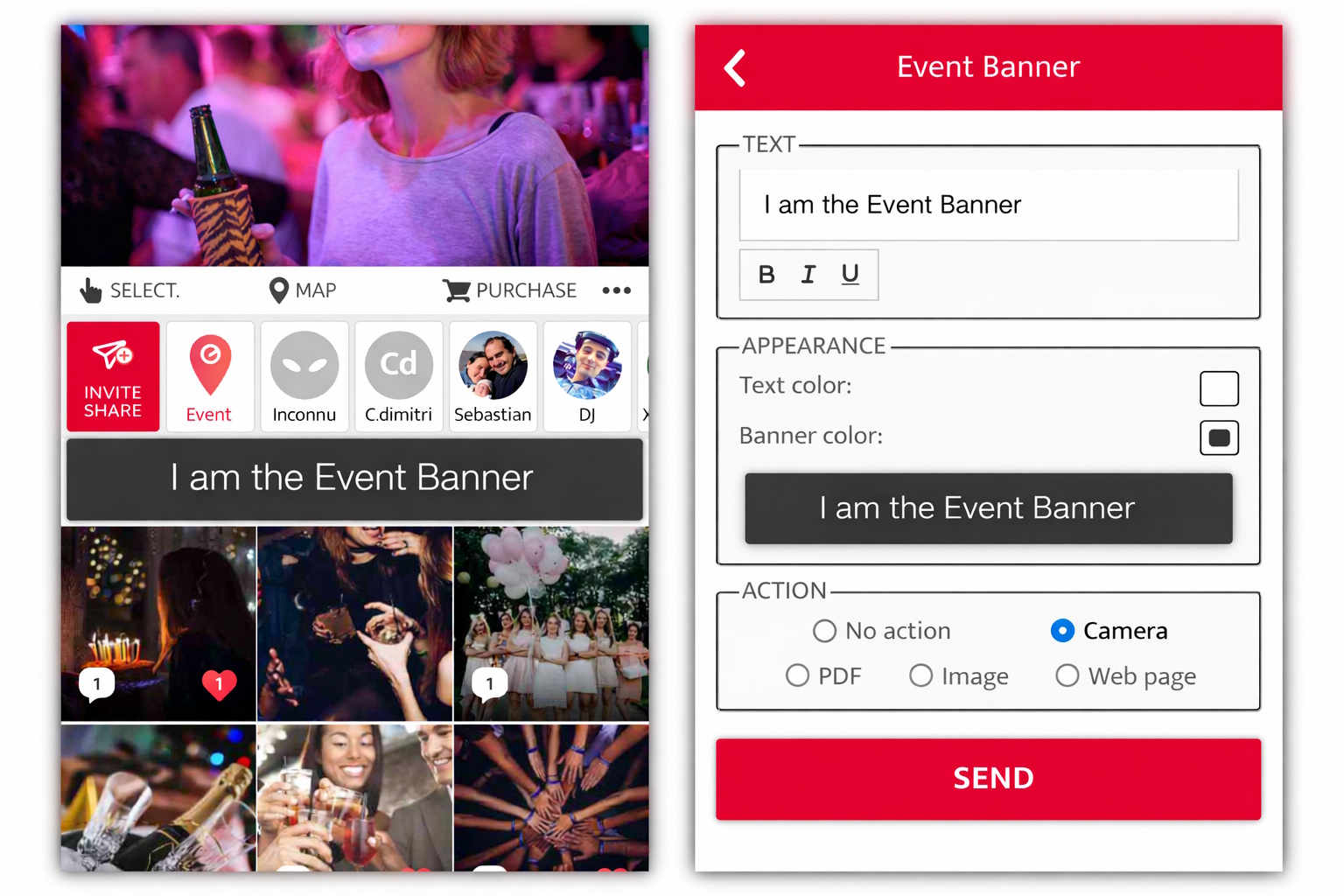
Display a personalized message at the top of the event to welcome your guests or make an announcement.
Event Chat
A discussion space dedicated to your communion. Perfect for directions, thank-yous… and staying in touch.
Notifications
If they wish, guests are notified when they are liked or commented on, there are new photos or a new message (Event Chat).
Likes contest
The most liked post is displayed at the top of the event. May the best one win!
Map and directions
Guide your guests to the party venue.
Guest list
See who is participating in your communion.
Save and share
Retrieve and share the communion photos/videos from your smartphone or computer.
Sort and search
Chronological order. Sort by likes, by guest, …
Moderation
Guests can report content and comments. The administrator can delete inappropriate content and exclude unruly guests.
Pin
Highlight important content.
No duplicates
Eventer makes sure the same photo or video doesn’t appear more than once in the album.
Unlimited
As many guests, photos and videos as you like, kept for as long as you wish. Server fees for events with more than 500 guests.
Live Movie
Broadcast live on screen. Immersive full-screen display, photos, videos, likes and comments live — participation and atmosphere guaranteed.
Privacy and image rights
Events are accessible only by invited guests. At any time, the organizer can delete the entire event and each guest can request the removal of their image or delete their contributions. Your photos and data are never sold or shared. Eventer claims no rights over content or data and is GDPR-compliant, with servers in Europe.
After Movie
End your communion on a high note.
Your guests make the film: their likes pick the best moments, and the music adds the emotional touch.
The After Movie stays alive: late photos join in, and it reacts to new likes.
And if you’d like to create your own video, that’s possible too — with Eventer Video.
An unforgettable moment?
That’s Eventer’s promise: to make this moment magical… and to keep it safe for you.
On your computer or your smartphone, a year from now, ten years from now — when your child has grown up — this great day, and the look in your guests' eyes, will always be within reach.
Your questions about First Communion photo sharing
Do my guests need to install an app?
They have the choice: without an app via the web page, or with the app (App Store, Google Play) — we explain the differences. Either way, one click on the invitation link (or a scan of the QR code) is enough, and everyone ends up in the same album.
How many guests can join?
The number of guests is unlimited (server fees apply beyond 500 guests). From an intimate lunch to a big family gathering: one link, one QR code for everyone.
Can guests join the event before the communion?
Yes: as soon as your event is created, you can send the invitation link or print the QR code on the invitations. That way, your guests can get familiar with Eventer before the big day.
The grandparents aren’t very comfortable with technology…
It’s covered: no mandatory app, and you can let your guests take part without signing up — one click on the link or a scan of the QR code, and you’re in the album. And if someone gets stuck, our 7-days-a-week support is happy to help them out — before, during and after the communion.
Part of the family can’t be there?
They won’t miss a thing: invited to the album, distant loved ones see the photos arrive live, like them, comment and share the emotion of the big day — even hundreds of miles away.
Who can see the photos/videos of the communion?
Only your guests: the album is not public and you only get in by invitation — something that matters when children are in the photos. You can remove content or exclude an unwanted guest. Your photos and data are never sold or shared, and Eventer claims no rights over your content — GDPR-compliant, with servers in Europe.
Can certain features be disabled for guests?
Eventer offers a lot of possibilities. If some features don’t suit the context of your event, the Control Pack option lets you frame Eventer’s features for your guests: read-only album, chat reserved for administrators, content limited to the communion period or to direct camera capture, comments and camera effects that can be disabled.
Does this also work for a confirmation?
Of course: first communion or confirmation — every big milestone can have its own album, and it works the same way. It was already true for the christening.
Is there a limit to the number of photos or videos?
No: the number of photos and videos is unlimited, even in the free version.
What if the connection is bad?
Eventer is built for event networks: saturated wifi, spotty 4G, dropouts — everything keeps working, and interrupted uploads resume automatically as soon as the network comes back. No one has to do anything, nothing is lost.
What if the same photo or video is added more than once?
Eventer has a content-based duplicate detection system. It therefore only appears once, even if it is added again from another device.
Can photos/videos be added after the communion?
Of course: the photographer and latecomers alike can add their photos and videos after the communion, from their phone or from a computer. You and your guests will be notified, and the After Movie includes them automatically.
Can you create a memory video of the communion?
Yes: at the end of the communion, Eventer Video creates a real video — an MP4 file to download and share — from your guests' photos and videos. You choose the moments, the music, the length and the format, and each guest can create their own too. Discover Eventer Video.
Will my photos/videos disappear after a few months?
No. Unlike most solutions, your Eventer albums remain accessible to you and your guests for as long as you wish — they’ll still be there when your child has grown up.
How do I get all the photos after the communion?
By default we keep the event for you indefinitely (unless you delete your event). If you wish, though, you can retrieve the photos/videos in a few clicks from your smartphone or computer.
How much does Eventer cost for a communion?
The essentials are free: shared album, unlimited guests, unlimited photos and videos, photobooth, Live Movie projection, After Movie.
If you want to make your communion even more unforgettable, you can purchase options that allow you to customize your event and activate certain features.
Try Eventer now
It’s free — and the best way to discover what Eventer can offer you.
A question?
Eventer listens to its users and provides 7-days-a-week support, available at every step, for the organizer and guests alike. No automated replies: a human guides and advises you, for a smooth, worry-free experience.
Paid options
If you want to make your communion even more unforgettable, you can purchase options that allow you to customize your event and activate certain features.
Live Show
The Live Show animates your communion and encourages your guests to join the album. Connect your PC/Mac to a screen and broadcast content live! Configure it directly from your smartphone and send messages to the screen.
Full Pack
All the communion photos are saved without any alterations. You keep the original resolution as well as all metadata (GPS, dates, orientation…) — ideal for printing your photos, even in large formats. Your guests can also add videos longer than 30 seconds, up to 6 GB each (speeches, songs, words from the godparents…).
A tip: activate the option before the communion — it only applies to photos and videos added once it’s active.
Personalized Filter
Easily customize the camera and Photobooth by creating your filter directly in Eventer: frame, color, text, character…
Pro Filters
The Pro Filters option offers more possibilities (logo, illustration, etc.). It allows you to upload your own filters (PNG) and a background image (JPG) for the camera and the Photobooth. If you’re not comfortable with graphic design tools, you can use an AI to create your filter in a few clicks.
Quiz
Liven up the communion with an interactive quiz — who knows the star of the day best? The AI assistant writes the whole quiz in one click and checks every answer.
Your guests play from their smartphone using the same QR code as the photos/videos. The results join your communion album.
More on our article Nailing Your Quiz.
Banner Plus
The Banner Plus option allows you to change the colors of the event banner and link an action to it (camera, PDF, webpage). Ideal for integrating a program, a surprise, explanations, contest, quiz, challenge, poll…
Real-time AI Moderation
Block inappropriate content in real time with artificial intelligence, for a worry-free communion.
Control Pack
Some events call for clearer boundaries: the Control Pack gives you finer control over what your guests can do.
- View Only: guests cannot add content.
- Event Chat: guests cannot write in the chat.
- Content rules:
- disable comments,
- only accept content taken during the communion dates,
- enforce the Eventer camera as the only source.
- Camera effects: disable text on photos, the Pimp, the AI accessories (glasses, hats…) and FaceSwap — recommended for more serious events.
- Multiple administrator accounts
AI Theming
Add AI to your photobooth and immerse your guests in the atmosphere from the very first photo. We work with you to create a unique visual universe that will magically transport them to the heart of the party’s theme — spring garden, fairy tale, imaginary world…
A movie, an era, a masterpiece painting, an imaginary world… you have the theme, we capture it in photos or bring it to life in videos.
Try Eventer now
You’ll discover what Eventer can offer you — and whether a paid option is really necessary for you.